Product AdKit vs Google Web Designer
Product AdKit vs Google Web Designer
Google Web Designer is Google's free desktop app for hand-building animated HTML5 display banners on a timeline and canvas. Product AdKit takes the opposite approach for ecommerce: upload one product photo and it generates a pack of static ad angles, no canvas to lay out frame by frame.
Where Google Web Designer hands you an empty timeline to animate, Product AdKit starts you with finished previews. The first ones are full-quality and view-only. Unlock the full pack only when the angles are worth exporting as high-res, no-watermark files in Meta sizes.
Examples
Product AdKit vs Google Web Designer examples
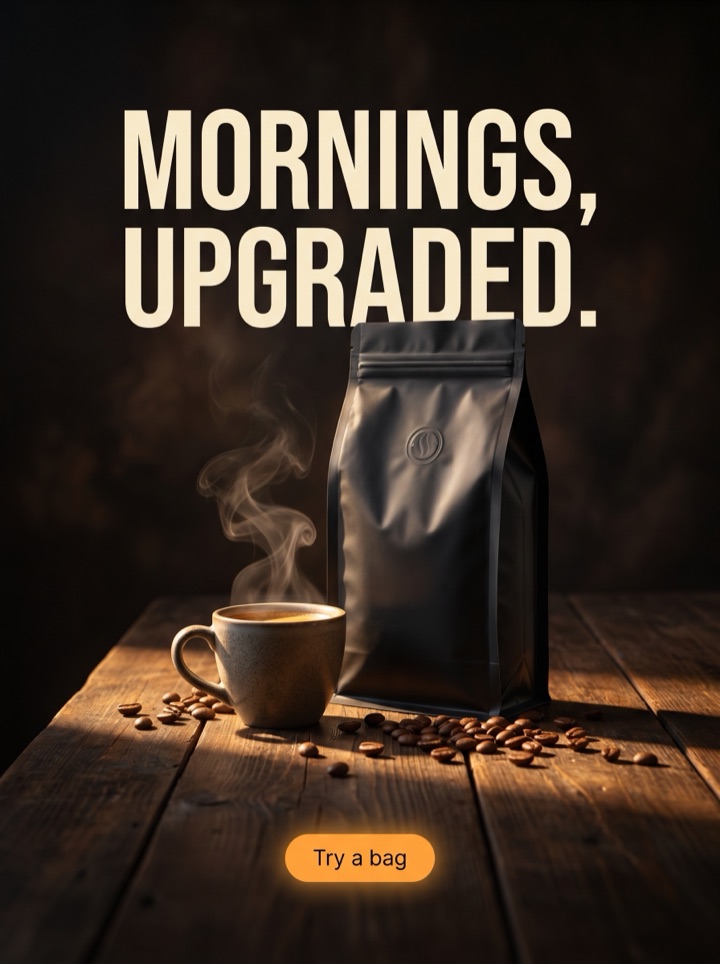
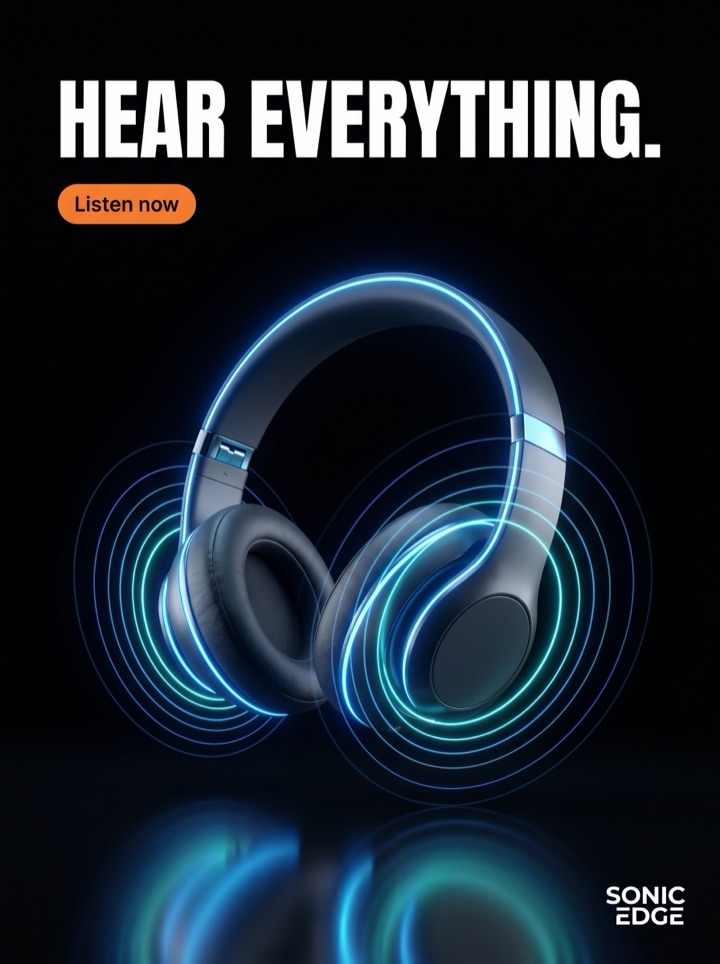
In Google Web Designer you would build each of these by hand on the canvas, sizing layers and setting keyframes. Here they are generated from one product photo. The point of the comparison is speed-to-first-draft: how many testable angles you get before you would have finished animating a single banner.




Methodology
Comparison method and disclosure.
We make Product AdKit, so this page is not neutral. It compares the job each tool is best for, cites public sources, and states where the other product is the better choice.
Sources checked
Prices and feature claims should be rechecked before major edits. This version was reviewed on June 4, 2026 against official Google Web Designer source and Product AdKit's shipped static-ad workflow.
Where Google Web Designer wins
Google Web Designer is stronger for free, hands-on HTML5 banner authoring with timelines, animation, and code-level control.
Where Product AdKit wins
Product AdKit wins when the campaign does not need HTML5 yet and the founder needs static ad angles without learning a timeline editor.
Campaign brief
Product AdKit vs Google Web Designer campaign brief
The decision here is not "which tool is better" but "which job am I doing." Google Web Designer is built for crafting one polished animated unit; Product AdKit is built for getting many static angles fast. Use these notes to pick the right side for the task in front of you.
Pick Google Web Designer when
You need an animated HTML5 display banner with custom motion for Google Ads or Display & Video 360, and you have the time to build and validate it frame by frame.
Pick Product AdKit when
You need several static product ad angles for Meta and feed this week, and the product photo can carry the first impression without a hand-built canvas.
Asset to upload
For Product AdKit, start with a clean product image and enough empty space for a headline and CTA. You are feeding a generator, not importing layers into a timeline editor.
First test
Generate a few angles and compare a promotional version against a premium one. That is the test Google Web Designer makes slow, because each variant is a separate hand-built banner.
Format choice
Export static posters first as 1:1 square and 4:5 feed. Treat display and HTML5 as the territory where Google Web Designer is still the live tool today.
Human review
Before publishing, check that the headline could only belong to this product. Generation gives you speed; the founder's eye is what keeps an angle from feeling templated.
How it works
The Product AdKit flow, side by side with the Google Web Designer canvas.
1
Upload, don't lay out
Where Google Web Designer starts with an empty stage and a list of layers, Product AdKit starts with your product photo. The photo is the input, not the first thing you have to place by hand.
2
Choose the buying reason
Generate angles that fit the campaign: proof, urgency, launch, premium, or bundle. Each is a finished static draft, not a blank frame waiting for keyframes.
3
Preview the pack
Review view-only previews and keep the directions worth running. This is the volume step that a manual timeline builder is not designed to make fast.
4
Export what you can test
Unlock high-res static files for Meta and feed. For animated HTML5 display units, Google Web Designer remains the live export path today.
Examples
Product AdKit vs Google Web Designer examples
Each of these is a buying reason you can generate as a static poster in minutes. In Google Web Designer the same set would be a series of separate banners to design and animate one at a time.
Field notes
Product AdKit vs Google Web Designer field notes
Practical guidance for a founder deciding between a hand-built HTML5 banner in Google Web Designer and a generated static ad pack. These are the calls worth making before you commit time to either.
Creative review
- If the brief genuinely needs motion, an expanding banner, or interaction for Google Display, Google Web Designer earns its learning curve and Product AdKit will not replace it.
- If you only have one hero placement to nail and unlimited time, the manual canvas lets you control every pixel and keyframe in a way a generator cannot.
- But if you find yourself rebuilding the same banner in five sizes by hand, that repetition is the signal a generated static pack would have saved hours.
- Be honest about how often you actually ship animated HTML5. Many stores open Google Web Designer once, then live on static Meta creative.
Placement review
- Feed Product AdKit a clean product photo with room for a headline. It is not a layer editor, so the input quality of the photo matters more than any setting.
- Generate one premium-calm version and one promotional version so the first Meta test has real contrast, instead of one banner tweaked five ways.
- Check every angle at phone width before export. Benefit copy that reads on a desktop canvas often disappears in a feed thumbnail.
Export review
- Do not let a generated headline promise something the product page cannot back up. Speed of creation is no excuse for a claim the landing page walks back.
- Today, the live export from Product AdKit is the static high-res poster. The validated HTML5 ad ZIP that Google Web Designer produces is a roadmap item here, not a current feature.
- If a display ad ZIP is your blocker this week, do that build in Google Web Designer. Use Product AdKit for the static Meta and feed half of the campaign.
Sizes and exports
Sizes and exports for Product AdKit vs Google Web Designer
Google Web Designer is organized around IAB display sizes and animated HTML5 output. Product AdKit is organized around the static social placements below. Validated HTML5 ZIP export stays clearly labeled as a roadmap Pro and agency feature until it is enabled.
1:1 square
Use 1:1 square when the product, hook, and CTA need a balanced layout. This is a placement Google Web Designer treats as a custom canvas; here it is a ready preset.
4:5 feed
Use 4:5 feed when the product needs more vertical room than a square but still lives in the Meta feed rather than a display network slot.
9:16 story/reels
Use 9:16 story and reels for full-screen mobile placements where the product and CTA need strong top-to-bottom spacing. Not a banner size Google Web Designer targets first.
HTML5 display
Animated HTML5 display banners are Google Web Designer's home turf today. Product AdKit's validated HTML5 ZIP export is roadmap, so do not pick it for a display deadline this week.
Google Web Designer gives you a timeline and a canvas to craft one HTML5 banner at a time. Product AdKit centers the product workflow instead: which photo to use, which hook to test, which static placement to export. Pick the builder when you need motion; pick the pack when you need volume.
Copy examples
Hooks, CTAs, and mistakes for Product AdKit vs Google Web Designer.
Headline hooks
- Skip the timeline: product photo in, ad pack out.
- Google Web Designer animates one banner. Product AdKit drafts a dozen angles.
- No keyframes, no layers, no canvas to lay out by hand.
- When you need volume, not a single perfect display unit.
- The manual builder is for motion. This is for a weekly Meta refresh.
- One product image, several reasons to buy, zero frames to design.
- From photo to export-ready static ad without opening a canvas.
- Hand-built HTML5 has its place. So does generating the static pack in minutes.
CTA examples
- Generate a pack, not a banner
- Generate a free preview
- See the static ad pack
- Skip the canvas
- View pricing
Common mistakes
- Reaching for Google Web Designer's timeline when the job is really five static Meta variations.
- Expecting Product AdKit to export a validated HTML5 display ZIP today; that is still roadmap.
- Choosing a hand-built banner editor for a weekly variation task that just needs speed and volume.
- Comparing the two on feature counts instead of which workflow fits the placement you are filling.
- Spending an afternoon animating one banner before testing whether a static angle even converts.
Examples
Product AdKit vs Google Web Designer examples
Use this checklist as a human quality pass before you commit to either the Google Web Designer canvas or a generated static pack.
1
Does this task actually need motion or interaction? If not, the Google Web Designer timeline is effort you do not have to spend.
2
Are you about to rebuild the same banner across several sizes by hand? That is the signal a generated pack saves the most time.
3
Is the live static export separated from roadmap formats? Do not treat Product AdKit's planned HTML5 ZIP as available today.
4
Is the product still clearly readable after the static angle is cropped into its target Meta or feed placement?
5
If a display ad ZIP is the real deadline this week, have you kept that build in Google Web Designer rather than waiting on the roadmap?
FAQ
Product AdKit vs Google Web Designer questions
What does Google Web Designer do that Product AdKit does not?
Google Web Designer is a free desktop app for hand-building animated HTML5 display banners on a timeline and canvas, with full control over layers, keyframes, and ad-network code. Product AdKit does not give you that timeline editor. It generates static product ad posters from one photo so you have testable creative without building each frame yourself.
Is Product AdKit a replacement for Google Web Designer?
Not for animated HTML5 display work. If you specifically need a hand-animated banner with custom motion for Google Display, Google Web Designer is the right tool. Product AdKit is the faster choice when you want several static product ad angles for Meta and feed placements without opening a canvas at all.
Does Product AdKit export a validated HTML5 ad ZIP like Google Web Designer?
Not yet. Google Web Designer exports validated HTML5 ad bundles today. Product AdKit ships static posters first; validated HTML5 ZIP export is a roadmap feature planned for agency users and is not live, so do not pick Product AdKit if a clean display ZIP is your blocker this week.
Why would a founder use Product AdKit instead of Google Web Designer?
Because the manual builder is slow when you need volume. Google Web Designer expects you to lay out and animate every banner by hand. Product AdKit turns one product photo into a pack of ad angles in minutes, which fits a solo founder doing a weekly creative refresh rather than a single polished display unit.
Related tools